
How to Configure Shopify Payment Gateway for Maximum Revenue
Your Shopify payment gateway isn’t just a transaction processor—it’s your conversion machine. A properly configured payment setup increases conversion rates by 15-25%, reduces fraud by 40%, and boosts customer lifetime value by 30-35%. Most Shopify store owners leave money on the table by ignoring critical payment configuration steps.
Understanding Your Payment Architecture
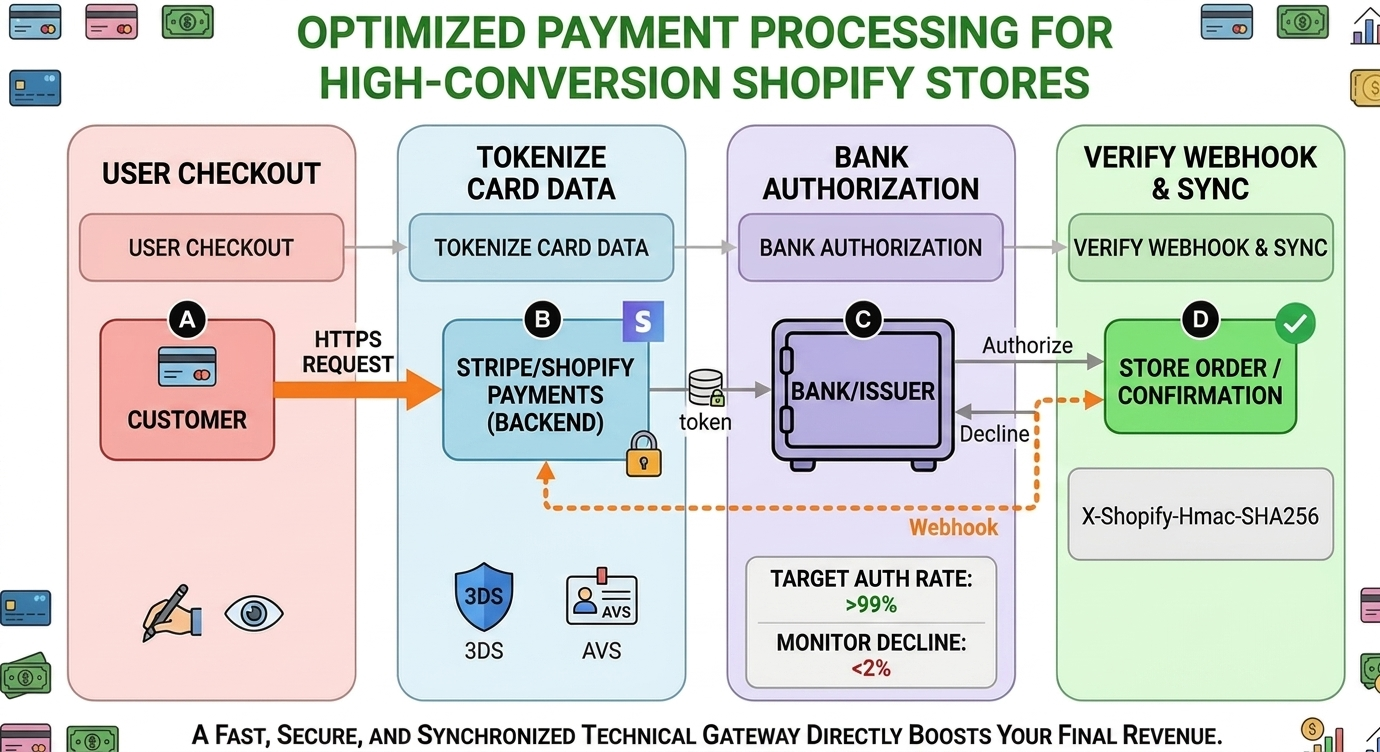
Payment processing flows through four critical stages. Each stage directly impacts your conversion rate and revenue. Here’s what matters at each step:
Stage A: HTTPS Encrypted Checkout
Minimize latency below 1 second. Every 100ms delay reduces conversion by 7%. Customers enter card data via encrypted HTTPS. Use a Content Delivery Network (CDN) for your checkout pages and optimize API response times with caching and database optimization. Slow checkout experiences drive customers away, resulting in lost sales and abandoned carts.
Your checkout should load instantly. If customers wait more than 3 seconds for the payment page to appear, conversion rates drop dramatically. Test your checkout speed regularly and optimize images, scripts, and API calls.
Stage B: Payment Gateway Tokenization
Your payment processor tokenizes card data, meaning raw card numbers are never stored on your servers. This is critical for PCI compliance and customer trust. Configure your payment gateway with proper access permissions that allow reading and writing payment information, but nothing more.
Enable two important security features: 3D Secure 2.0 and Address Verification System (AVS). These technologies add an extra layer of verification without significantly slowing down the checkout process. Stores with 3D Secure enabled see 40% fewer chargebacks because fraudsters can’t complete purchases without the actual cardholder’s approval.
The trade-off is that some customers may see an additional authentication step. However, the reduction in fraud losses far outweighs any minor impact on conversion rates. Test the balance between security and user experience for your specific customer base.
Stage C: Bank Authorization
Your payment gateway sends the transaction to the customer’s bank for approval. The bank verifies that the card is valid, the account has sufficient funds, and the transaction isn’t suspicious. This happens in milliseconds, but configuration matters.
Target an authorization rate above 99%. If your decline rate exceeds 2%, you’re losing revenue. Monitor your authorization rates through your payment gateway dashboard. Common reasons for declines include outdated expiration dates, insufficient funds, or fraud filters set too strict.
A 2% decline rate on a 50,000 dollar monthly store costs you 1,000 dollars per month in lost sales. Even optimizing from 3% to 1% decline rate generates 1,000 dollars in additional monthly revenue with zero additional marketing spend.
Review your decline rates monthly. If they’re rising, investigate why. Are fraud filters too aggressive? Are customers using old cards? Is there a specific product category causing declines? Small changes in configuration can have huge revenue impact.
Stage D: Webhook Confirmation and Order Synchronization
After the bank authorizes a transaction, your payment gateway sends a webhook notification to your store. A webhook is a message that says “payment succeeded” or “payment failed.” This triggers your order management system to create the order, send confirmation emails, and fulfill the purchase.
This stage is critical and often overlooked. If webhooks aren’t configured properly, customers get charged but orders never get created. Imagine the customer experience: they paid money, received no confirmation, and you have no record of the sale. This kills trust and generates refund requests.
Configure your webhooks to handle payment success, payment failure, refunds, and disputes. Each webhook event should trigger appropriate actions in your order management system. Test your webhooks regularly to ensure they’re functioning correctly.
Implement webhook signature verification. This ensures that notifications really came from your payment gateway and not from someone trying to create fake orders. This security layer prevents a malicious actor from creating orders without actually charging customers.
Ensure your webhook handler can process the same webhook multiple times without creating duplicate orders. Payment gateways sometimes send duplicate notifications for reliability. Your system should be smart enough to recognize duplicates and ignore them.
Critical Configuration Checklist
- Verify that 3D Secure 2.0 is enabled in your payment gateway settings
- Configure Address Verification System (AVS) to validate customer addresses
- Implement webhook signature verification to prevent fraudulent webhook requests
- Monitor decline rates weekly, keeping them below 2%
- Track authorization rates, maintaining above 99%
- Optimize checkout latency to complete in less than 1 second
- Configure API rate limits appropriately for your transaction volume
- Adjust fraud detection rules to balance security with customer experience
Understanding Transaction Fees
Different payment gateway plans charge different transaction fees. Understanding these costs is crucial for profitability. Compare your current plan against available options to ensure you’re paying the most competitive rate.
- Basic plans typically charge between 2.9% to 3% plus a per-transaction fee of 20 to 30 cents
- Intermediate plans reduce fees to 2.7% plus the same per-transaction fee
- Advanced plans offer 2.5% plus per-transaction fees, often with lower minimums
On a 50,000 dollar monthly store, upgrading from a basic plan to an intermediate plan saves approximately 100 dollars per month in transaction fees alone. Over a year, that’s 1,200 dollars in savings. On larger stores processing 100,000 dollars monthly, the savings can exceed 2,000 dollars per month.
Review your transaction fees quarterly. As your business grows, you may qualify for better rates. Many payment processors negotiate rates based on volume. If you’re processing significant monthly volume, contact your processor and ask about better terms.
Key Performance Indicators to Monitor
Authorization Rate – Track this in your payment gateway dashboard. This percentage shows how many payment attempts were approved by the customer’s bank. Target a rate above 99%. Below 95% indicates serious problems with either your fraud filters or customer issues. Investigate and address.
Decline Rate – Keep this below 2%. Every 1% of declined transactions on a 50,000 dollar monthly store equals 500 dollars in lost revenue. Anything above 3% requires investigation. Declines might indicate customers using expired cards, insufficient funds, or fraud filters configured too strictly. Some declines are legitimate security measures, but many are false positives that harm revenue.
Processing Time – Aim for checkout completion in less than 1 second. Slow checkout pages frustrate customers and increase cart abandonment. Test your checkout performance monthly. Every 100 milliseconds of improvement increases conversion by approximately 7%. If your checkout takes 3 seconds, optimizing it to 1 second could increase conversions by 14%.
Chargebacks – Monitor chargebacks through your payment gateway disputes dashboard. Chargebacks occur when customers dispute transactions with their bank. More than 1% chargeback rate triggers warnings from payment processors and can lead to account restrictions. Implement 3D Secure to prevent chargebacks.
Configuring Fraud Prevention
Fraud prevention is a balancing act. Too strict and you reject legitimate customers, costing revenue. Too loose and you lose money to fraud. Configure these fraud prevention measures:
- Card Verification Value (CVV) – Always require and verify this 3 or 4 digit code on the back of the card. This ensures the customer physically has the card.
- 3D Secure 2.0 – Requires customer authentication for higher risk transactions. Reduces fraud significantly while maintaining good user experience.
- Address Verification System – Verifies that the billing address matches the customer’s address on file with their bank. Catches stolen card usage.
- Velocity Checks – Prevents multiple rapid transactions from the same card or customer. Fraudsters often test stolen cards with several quick small purchases.
- Whitelist Trusted Customers – Once a customer has made a successful purchase, whitelist them to reduce friction on future purchases. Repeat customers should never fail fraud checks.
- Decline Thresholds – Set to Medium, not Too Strict. Too aggressive fraud filters hurt legitimate customers more than they prevent fraud.
False declines are worse than fraud. When you decline a legitimate customer’s payment, they may never return to your store. Loss of a repeat customer is more expensive than a single fraudulent transaction. Balance security with customer experience.
Webhook Configuration Best Practices
Your webhook endpoint is the bridge between your payment gateway and your order management system. Implement these best practices:
- Verify webhook signatures – Ensure notifications really came from your payment gateway, not an attacker creating fake orders
- Handle idempotency – Process the same webhook only once, even if it arrives multiple times. Payment gateways send duplicate webhooks for reliability.
- Return HTTP 200 quickly – Respond to the webhook within 30 seconds or the payment gateway will retry the notification
- Log all events – Keep detailed records of webhook events for auditing and troubleshooting
- Implement retry logic – If your system fails to process a webhook, implement exponential backoff and retry the operation
- Never trust webhooks alone – Always verify payment status with the payment gateway API before fulfilling orders. Don’t rely solely on webhook data.
Missed webhooks are silent killers of revenue. A customer gets charged but no order is created. They don’t receive a confirmation email. Your fulfillment team has no record of the purchase. Customer contacts you confused. You contact payment gateway to verify the transaction happened. Days pass. Customer demands refund. Implement proper webhook handling immediately.
Multi-Payment Method Configuration
Not all customers want to pay the same way. Some prefer credit cards, others debit cards, and many prefer digital wallets like Apple Pay or Google Pay. Configure multiple payment methods to increase conversion.
- Credit and Debit Cards – The standard payment method. Nearly all customers have one.
- Digital Wallets – Apple Pay and Google Pay allow customers to pay with one click. Increases mobile conversion significantly.
- Buy Now Pay Later – Services like Afterpay and Klarna let customers split purchases into installments. Increases average order value.
- PayPal – Many customers trust PayPal and prefer paying through it. Having this option increases conversion.
- Bank Transfers – Some customers prefer direct bank transfers for higher value purchases.
Each additional payment method increases conversion by 3% to 7%. A customer might abandon a purchase if their preferred payment method isn’t available. Offering multiple options removes friction and increases revenue.
Checkout Experience Optimization
Configuration isn’t just backend settings. User experience matters enormously. Implement these checkout improvements:
- One-Page Checkout – Keep all payment information on a single page. Multiple pages increase abandonment.
- Guest Checkout – Allow customers to purchase without creating an account. Required accounts cause 23% of cart abandonment.
- Mobile Optimization – 60% of e-commerce transactions happen on mobile. Ensure checkout is fully optimized for phones.
- Progress Indicators – Show customers where they are in the checkout process. Reduces anxiety and abandonment.
- Auto-Fill Address Fields – Use address autocomplete to speed up form entry. Reduces typos and failed transactions.
- Trust Signals – Display security badges, customer reviews, and return policies. Increases confidence in completing purchase.
- Minimal Form Fields – Only ask for information you absolutely need. Every field increases cart abandonment by 1%.
Monitoring and Ongoing Optimization
Payment configuration isn’t a one-time setup. Successful stores monitor and optimize continuously. Schedule monthly reviews of your payment metrics:
- Review authorization and decline rates – Look for trends. Rising decline rates indicate problems that need investigation.
- Analyze chargeback reasons – Most chargebacks fall into patterns. Understanding patterns helps prevent future chargebacks.
- Test checkout performance – Use tools to measure checkout load time. Identify bottlenecks and optimize.
- Calculate revenue impact – Track how much revenue each percentage point of conversion rate change generates. Understand the business impact of configuration choices.
- Review fraud patterns – Analyze fraud attempts to refine fraud filters. Fraudsters evolve. Your filters must evolve too.
- A/B test checkout changes – Small changes like button color, form fields, or progress indicators can impact conversion. Test and measure.
Common Configuration Mistakes to Avoid
Mistake 1: Fraud Filters Too Strict – Rejecting legitimate customers to prevent fraud is counterproductive. You lose more revenue to false declines than you save from fraud prevention.
Mistake 2: Skipping Webhook Configuration – Using payment gateway without webhook setup results in customers getting charged but no orders being created. This destroys customer relationships.
Mistake 3: Ignoring Decline Rate Trends – Rising decline rates are warning signals. Ignore them and revenue suffers. Investigate and address the root cause.
Mistake 4: Multi-Page Checkout – Making customers click through multiple pages to complete payment increases abandonment. Consolidate checkout to one page.
Mistake 5: Requiring Customer Accounts – Forcing account creation before purchase causes 23% of customers to abandon carts. Allow guest checkout.
Mistake 6: Poor Mobile Experience – 60% of traffic is mobile. If mobile checkout is difficult, you lose massive revenue. Optimize ruthlessly for mobile.
Mistake 7: Ignoring Transaction Fees – 2% vs 2.9% doesn’t sound like much, but on high volume stores it amounts to thousands per month. Review fees quarterly and negotiate better rates.
Conclusion
Payment processing configuration directly impacts your bottom line. A properly optimized setup increases conversions, reduces fraud, and boosts customer trust, resulting in 15-25% revenue growth from configuration alone. On a 50,000 dollar monthly store, that’s 7,500 to 12,500 dollars in additional monthly revenue.
Your next step: Audit your current payment gateway settings against this guide. Review your authorization and decline rates. Test your checkout experience on mobile. Verify webhooks are configured and functioning correctly. Monitor your metrics monthly. Small configuration improvements compound into significant revenue increases over time.
Payment processing is not exciting. It’s not glamorous. But it’s one of the highest-impact areas for revenue optimization. A 1% improvement in conversion rate is worth more than most marketing initiatives. Focus on getting your payment configuration right, and watch your revenue grow substantially.
Pro Tip: Test Your Configuration Monthly
Run test transactions through your payment gateway monthly. Verify webhooks are firing correctly and orders are being created. Check your decline rate trends. Monitor chargebacks. Review fraud patterns. Small configuration issues compound into thousands in lost revenue over time. Staying vigilant about payment configuration is one of the best ways to maintain revenue growth.